Showing posts with label google. Show all posts

Thursday, 21 February 2013


Thinking to cheat AdSense?
Stop that. It will never bring you anywhere. You might pull it off with smaller ads network, but definitely not with Google. Here are some detection methods they might use. At the very least, they have the resources to do so.

IP Address
If the AdSense click is originated from the same IP Address as the one used for accessing your AdSense account, your account is flagged.
Cookies
Most home users do not use static IP Address for Internet connection. In most cases just disconnect and reconnect will give you a new IP Address. But don’t forget, Google has set cookies on your computer.

Other Google Services
Thinking that you are safe just because you do not access your AdSense account? Think again. This time, consider these: GMail, Google Earth, Google Calendar, Google Search, Google Toolbar, Google Talk, Google Sitemap, Google Desktop, Blogger, and so on, and so on. With the wide range of services they provide, Google can trace the originator of most (or probably almost all) clicks.

Click Pattern 1
Oh, why this computer / IP address / person is so trigger-click-happy on this particular website but never click on the ads on other sites?

Click Pattern 2
And why is it that people accessing these sites direct (type-in URL or from bookmark) tend to be very active ad-clickers compared with those referred from search engine or other sites?

Click Pattern 3
And why the ad-clickers like to hit and run, compared with non ad-clickers that surf a few pages before leaving?

Click-Through-Rate (CTR)
Your CTR may range from 0.5% to 10%, but if it exceeds a certain point (probably around 10%), you are flagged.

Geo-Location
Used Urchin (Google Analytics) before? Then you should know that Google can trace traffics origin down to the small town. Different IP doesn’t mean much. Unless you site is really targeted to one small geo-point, a high number of clicks from nearby location will get you banned quickly.

Hardware address
MAC address of the LAN card, modem, and router works almost like a fingerprint. I’m not sure if Google can track this, but probably they do. They have rocket scientist, remember?

Advertiser’s conversion rate
Ad click is one thing. But does it bring value to the advertisers? If none of the clicks on your site translate to conversion to the advertiser, you are in trouble. First the Smart-Pricing hits, then your AdSense account disabled.
Search Engine Ranking
Your website is not indexed on any search engine, not linked by any prominent website, but get consistently high traffic? That sounds like something is in play. Regardless of whether it is an adware-embedded software, spam, trojan clickbot, or intentionally installed click-exchange network, it doesn’t sound right.

Combo
Each of these detection methods might seem rather weak. But combine them together, and not many click-frauds can pass-through these filters. Even the smartest clickbot will have a hard time. In short, it is almost impossible to cheat AdSense in the long term. Instead of spending time, money, and effort trying to outsmart Google, try these tips to improve your AdSense earning.

Disclaimer: I’m not working for Google nor in anyway know anyone inside Google. Google might or might not use these methods to detect click-fraud. I’d believe that they have much better detection mechanism.

Sunday, 20 January 2013


MOUNTAIN VIEW, California — Want an easier way to log into your Gmail account? How about a quick tap on your computer with the ring on your finger?
This may be closer than you think. Google’s security team outlines this sort of ring-finger authentication in a new research paper, set to be published late this month in the engineering journal IEEE Security & Privacy Magazine. In it, Google Vice President of Security Eric Grosse and Engineer Mayank Upadhyay outline all sorts of ways they think people could wind up logging into websites in the future — and it’s about time.
2012 may have been the year that the password broke. It seemed like everyone on the internet received spam e-mail or desperate pleas for cash — the so-called “Mugged in London” scam — from the e-mail accounts of people who had been hacked. And Wired’s own Mat Honan showed everyone just how damaging a hack can be.
The guys who hacked Honan last August deleted his Gmail account. They took over his Twitter handle and posted racist messages. And they remote-wiped his iPhone, iPad, and laptop computer, deleting a year’s worth of e-mails and photographs. In short, they erased his digital life.
Passwords are a cheap and easy way to authenticate web surfers, but they’re not secure enough for today’s internet, and they never will be.
‘Passwords and simple bearer tokens such as cookies are no longer sufficient to keep users safe.’
— Eric Grosse and Mayank Upadhyay
Google agrees. “Along with many in the industry, we feel passwords and simple bearer tokens such as cookies are no longer sufficient to keep users safe,” Grosse and Upadhyay write in their paper.
Thus, they’re experimenting with new ways to replace the password, including a tiny Yubico cryptographic card that — when slid into a USB (Universal Serial Bus) reader — can automatically log a web surfer into Google. They’ve had to modify Google’s web browser to work with these cards, but there’s no software download and once the browser support is there, they’re easy to use. You log into the website, plug in the USB stick and then register it with a single mouse click.
They see a future where you authenticate one device — your smartphone or something like a Yubico key — and then use that almost like a car key, to fire up your web mail and online accounts.
In the future, they’d like things to get even easier, perhaps connecting to the computer via wireless technology.


Google Declares War on the Password


“We’d like your smartphone or smartcard-embedded finger ring to authorize a new computer via a tap on the computer, even in situations in which your phone might be without cellular connectivity,” the Googlers write.
The future may not exactly be password-free, but it will at be least free of those complex, hard-to-remember passwords, says Grosse. “We’ll have to have some form of screen unlock, maybe passwords but maybe something else,” he says, “but the primary authenticator will be a token like this or some equivalent piece of hardware.”
That means that if someone steals your card or your smart-ring, you’d better report it stolen pretty quickly.
Grosse and Upadhyay believe that once enough websites support this device-centric login technique, people mostly won’t need strong passwords, except in rare occasions — when they’re making significant changes to their account, for example.
But for Google’s password-liberation plan to really take off, they’re going to need other websites to play ball. “Others have tried similar approaches but achieved little success in the consumer world,” they write. “Although we recognize that our initiative will likewise remain speculative until we’ve proven large scale acceptance, we’re eager to test it with other websites.”
So they’ve developed a (as yet unnamed) protocol for device-based authentication that they say is independent of Google, requires no special software to work — aside from a web browser that supports the login standard — and which prevents web sites from using this technology to track users.


The great thing about Google’s approach is that it circumvents the really common attack that even Google’s existing mobile-phone authentication system can’t prevent: phishing.
Two years ago, Google introduced a two-step login option, which makes it harder for criminals to break into your account. With this option, Google typically sends users a secret code via text message every time they try to log into their accounts from a new computer.
The problem is that if criminals can convince you that you’re visiting Gmail even when you’re not, they can trick you into entering that secret code. In fact, the bad guys can even turn two-step authentication against legitimate users. Sometimes, they add their own phone number to the account “just to slow down account recovery by the true owner,” the paper states.
What do you do in the meantime? Well, you use that existing two-step authentication. It’s not perfect. But it’s better than just a password.
The good news is that people are actually using it — and we can thank Mat Honan for that. Honan’s story inspired a lot of people to lock down their Gmail accounts by linking them to their mobile phones.
“In the two days following Mat’s Wired article, a quarter-million people signed up for two step authentication,” says Grosse. He can’t say exactly how many people sign up on a typical day, but “it’s much less than that,” he says.
You can see the Epic Hack spike here, in this graph provided by Google:

Everyone logs into Google services like Gmail using a user name and password, but with Google’s two-step process, when you’re logging in from an unfamiliar computer, you also get a six-digit number messaged to your phone that you must enter before you can log in.
Honan says that if he’d had two-step authentication on his Gmail account, the whole incident probably would not have amounted to anything. But until the spammers and scammers decide to call it quits, we still need that Google ring.
Update: this story has been corrected to indicate the type of Yubico key device used by Google

Friday, 28 December 2012

SEO tools can help speed up your process and save you time, allowing you to concentrate on the important tasks. But with so many out there promising the earth how can you decide what you need and which tools to choose?
To help you out, we’re going to list the best tools for specific SEO jobs. Some of them are free and some require a paid subscription, but most offer a free trial so you can check them out and decide if they’re right for you.
However, don’t go signing up to every tool you see here. First you need to make a SEO plan for your campaign and make sure you follow it through. These tools are here to help you with your campaign, but they won’t do it all for you.
We’ve categorized our 25 tools into the main tasks of an SEO campaign, in the order you’d normally action them, starting with the research phase. You can consider these categorize as your top-level task when creating your plan. And remember, “He who fails to plan is planning to fail”.

Do your research
Before you start making any websites improvements or building links, first you’ll need to do some research. You’ll need to determine which keywords you want to target and this will be based primarily on how much traffic and competition keywords have. It’s also important to remember that you want relevant keywords that are likely to convert into a sale or a lead. Bigger traffic is not always better!

Google AdWords Keyword Tool

Probably the most well-known keyword tool to online marketers, Google’s keyword tool enables you to find related keywords to the ones you enter and see how many searches they get per month, both globally and locally to you.
You’ll be looking for the relevant to your website. You can easily export the data to Excel for manipulation and end up with a great keyword list starting point.
As this tool is freely available, it’s often the first port of call, even for professional SEOs.
Note that the figures it produces aren’t always perfect and you’ll need to understand the difference between exact and broad match when doing your research, but on the whole it’s one of,  if not the best keyword research tools available. Not to mention it’s from the search engine we all want to rank in!!

KeywordSpy


One of the best ways to discover keywords is by analyzing your competitors’. Keyword Spy provides a one-stop-shop for all manner of keyword research. You can easily spy on what your competitors have been optimizing for and also what they’ve been bidding on for Pay-Per-Click (PPC) campaigns. PPC campaigns can often give you a great insight into which keywords convert well, as the competition will have tested this already for you! Alternatives to keyword Spy include Word Tracker and SEMrush.

Micro Niche Finder & Market Samurai


Both these

tools help you find niche and long-tail keyword opportunities. In Micro niche finder you can quickly analyze data from lots of different sources and see special keyword scores such as Soc (Strength of Competition) and OCI (Online Commercial Intention). The OCI value will tell you if people are looking to purchase something or are looking for information.

SimilarSites


SimilarSites allows you to find websites that are similar to the one you’re looking to promote. The search results in Google will allow you to find most of your main competitors, but perhaps some of your competitors are targeting different keywords to the ones you are…
By using this tool you can find lots of competitors and then research them to find out what keywords they’re optimizing for. A simple idea, but very useful.

Google AdWords

If you’re promoting a brand new website or a website which hasn’t seen much traffic in the past, consider spending some money on Google Adwords so you can test how keywords convert quickly. There’s nothing worse than promoting a keyword for six months to end up finding it doesn’t convert very well SEO is all about testing to see what works and keyword research is no exception.

Optimize your Site

Once you’ve determined the keywords you want to target, you need to move on to optimizing your website’s content and code. The way you structure your site and the content you place on it helps Google determine what it thinks your site is all about. But there’s a lot to check, especially if you have a dynamic site with thousands of pages. You want to make sure keywords are targeted correctly and that there is nothing getting in the way of Google when crawling your website. the following tools can help you out.


Xenu Link Sleuth

This amazing free tool crawls your website in a similar way to Google and quickly finds broken links and other problems. Can all your web pages be found? Maybe they’re too many clicks away? With Xenu link sleuth you’ll be able to see a good overview of your website’s pages and fix or improve them. Try to get in the habit of running this tool on any new website you creates as it can help lick up simple mistakes that could be embarrassing later down the line.

Google Webmaster Tools

Again another free tool, webmaster tools gives you important feedback about your website from Google itself. You can also configure your website by adding a Google Site Map and setting a preferred domain, and see diagnostics for your website, which include crawl errors and HTML suggestions.

Google PageSpeed Tool

The speed of your website can have a big influence on your rankings, so Google has provided this free tool to measure it, and provides lots of great tips on how to improve things too. Some simple tweaks to your website can make all the difference here and you’ll be making your website visitors happy tool

SEO Powersuite- Website Auditor


A paid tool, Website Auditor is very comprehensive. It at first seems very similar to Xenu, but takes things a lot further and offers simple-to- follow reports for improving your website’s on-site SEO. It also caters for the internal linking of a website and can help you find ways to boost the page rank of pages you feel need more prominence. It will also help you optimize the content of your website and includes tools to analyze what your competitors are doing.
SEOmoz
Probably the best and most well known SEO website / toolset around at present, SEOmoz is found all over the place and for two good reasons. First, it combines great resources and tools to create an awesome place to learn and improve your SEO knowledge. And second, it has a rather cute looking ‘Roger the robot’.
One of the main differentiating factors from other all-in-one SEO tools is that SEOmoz offers amazing resources, training and tips. And if you will still need help there’s the Q&A system where you can ask a professional SEO any question you like.
There are also SEO Webinars where pro members connect directly with the experts behind SEOmoz. Each Webinar lasts for an hour-and-a-half and is based upon a specific SEO or online marketing topic.
Pro members can ask their own questions at the end and you can watch previous Webinars too.
If you want to know more about a website’s backlinks and are missing Yahoo Site Explorer (OSE). This will help you compare your website’s popularity not only in terms of backlinks, but also social mentions and SEOmoz’s own Domain Authority and page Authority metrics.
Finally there’s the SEOmoz community. It’s not only SEOmoz employees who contribute to the SEOmoz website: their users also regularly write in the YouMoz blog, a place where anyone can write an SEO article comments from other users. Some very interesting topics pop up, and every now and then the SEOmoz team likes a post enough to promote it to the main SEOmoz blog.
If you’re looking to learn or improve your SEO, you can’t go far wrong here.

LinkBuilding

There are many websites that offer linkbuilding services in return for your hard earned cash, but that’s not what this list is for. Instead, we’ll assume you’ll be doing your own link building and will be looking for quality links from trusted websites.
The main tasks for linkbuilding are identifying link prospects and implementing outreach to build relationships with the ultimate goal of securing a link. There’s a lot of information to keep track of and the following tools will help make is a lot easier for you.
 
MajesticSEO

MajesticSEO crawls the internet much like Google’s own spiders and indexes it all in its own database. With this massive database majesticSEO is able to provide extremely useful data about your site and your competitor’s sites.
Want to know all the links a competitor has? No problem! Simply run off a quick report and you’ll soon have everything you need to know.
The competitor links tool can help you find links that you can also acquire. It can also help you analyze the techniques your competitors are using and find out why ther’ve got the number one position and you don’t . Maybe they’ve been doing more article directory submissions, or maybe they’ve been doing something naughty like paying for do-follow links? You can dig into the data and find out all sorts of useful information.
Another great aspect of majesticSEO is the Backlink History tool, which enables you to chart this discovery of backlinks over time for multiple websites. This is great for seeing how much SEO effort your competitors are putting in and comparing it to how you’re doing. If you’re down in links per month, then you need to get working!
You may wish to know if your web server is in a bad neighborhood ( you don’t want your website being tarnished with the same brush as other spammy websites ). Using MajesticSEO’s neighborhood tool, all you need to do is enter your domain or IP address and it will provide you with a list of other websites on the same IP address or nearby, which you can then visually check. If you see lots of spammy websites then it might be prudent to consider changing your hosting provider.
MajesticSEO also includes a great tool called Clique Hunter, which can analyze the backlinks of several sites at once. You can use this to report on your site and your competitors at the same time and then identify which links your competitors have that you don’t while filtering out the ones you already have.

Ontolo

Ontolo’s primary function is to help you find relevant and quality link prospects. You let Ontolo know the keywords you want to target and it will scour the internet and come back with lots of prospective for you, all categorized by their type. You can then search thee link prospects to find suitable link opportunities for your campaigns. For example, if you’re looking to do guest posting you can find sites that are likely to accept guest posts and exclude pages from your competitors or sites you have already engaged with.
Finally the Majestic Million tool lists the top one million websites. This can be used to find authoritative link prospects-or you can simply bask in your glory if you find your website on the list! Interestingly the top three websites at the moment are google.com, facebook.com and adobe.com

Buzzstream


Trying to keep on top all the outreach you’ve done via email, Telephone, Twitter and so on can be an enormous task. You can end up with such massive Excel sheets containing all the contact information and reminders to follow up with people that some never get actioned.
Buzzstream solves this problem nicely with a custom online solution that enables you to keep all information in one place and categorize by website and campaign. It also enables you to send emails directly from the system and will collect replies and automatically add them into the contact history.
Plus it can help with link prospecting by automatically finding new websites to connect with everyday. If that’s not enough, it will also do project management and handle tasks for your different team members and track your links to see if they’ve gone live, or been lost.

Social media

Online social activity has been proven to influence search rankings and it’s now becoming more commonplace for social media to be included in SEO campaigns. Although nowhere near as important as link building, those Facebook likes and Twitter tweets can make a difference.

SproutSocial

A company can have so many social media profiles these days-with the likes of Facebook pages.
Twitter accounts, Google Plus and LinkedIn-that it can be difficult to keep on top of them all. Enter SproutSocial, a tool that provides complete social media management. With SproutSocial you can easily run campaigns to promote your offerings and engage with your online communities.

Tracking and Analysis

Fundamentally, SEO is all about testing. You want to know if what you’re doing is working and if you ban better it. So monitoring your results over time is extremely important. You’ll want to monitor everything from your rankings on Google to how much money you’re turning over.

Google analytics


Rankings are all very well and good, but as SEOers we need to remember the end goal, and that’s making money! So although we may have the positions, we need to know if they’re converting and how much money they’re making it doing online payments.
By using Google Analytics goal and e-commerce tracking we can see everything we need to know and adjust our SEO campaign over time as we determine which keywords perform the best from a business perspective.

Management

Trying to manage an entire SEO campaign can be a daunting and difficult task, especially if you have an SEO team all working on a project at the same time. You can consider project management tools such as Microsoft project or Basecamp, but why not use something specifically built for the jobs?

LinkDex


The linkdex platform is made up of many different features. The first main feature is the SEO task and project manager. This simple to use, but very effective, project management area enables you to assign tasks to different team members and easily report on them. Linkdex provides some sample task lists to get you started and you can, of course, make your own. The other great feature is that you can track ranking changes against completed tasks.
The next set of features helps you with your SEO tasks. There’s a backlink analysis system that will help you work out where you’re lacking in backlinks when compared to your competitors and there’s a website optimization system that will score your paged and suggest improvements. Linkdex provides some great analytics also, with a fully fledged keyword rankings checker where you can compare how you’re doing against your competitors. And finally, you can create and export lots of reports in different formats. Great for monthly client reports.

Raven tools


Raven tools are a one-stop-shop for your SEO tool need. The list of tools it includes is so long we couldn’t possibly mention them all here! You can use research tools, contact managers, keyword managers, use data from your Google adwords campaigns, grab Google analytics data and even access the system via their own free iOs app.
It also caters well for different user types. You can give users only the access they need and assign them tasks with little effort, allowing you to fully manage your SEO campaign.
There are also social media tools, content management tools and third-party connections to systems such as BaseCamp and MailChimp.

ENJOY -----------------------------------------------------------------------------------------------------------

Monday, 24 December 2012

 let's pretend you need a serial number for windows xp pro.

in the search bar type in just like this - "Windows XP Professional" 94FBR

the key is the 94FBR code.. it was included with many MS Office registration codes so this will help you dramatically reduce the amount of 'fake' porn sites that trick you.

or if you want to find the serial for winzip 8.1 - "Winzip 8.1" 94FBR

just try it out, it's very quick and it works nicely..

-----------------------------------------------------------

here is another trick that works fairly decent for finding mp3's on the web (which is hard to do normally, to say the least)

say you want to get, for example, a Garth Brooks song. type this in the search bar - "index of/" "garth brooks" .mp3 the ones you want to check out first are the ones that say "Index of/" in the title of the search result. this technique allows you to easily pull up web folders with direct downloads. it will look the same as if you were logging into a ftp url.. i'm sure you can be pretty flexible on how you type that in, so long as you include "index of/"

i'm sure you can use this for more than just mp3's (it's not perfect but it has worked for me on a few occasions)

always make sure to use the quotations where i placed them. they help pinpoint the correct search results more accurately. just try it out, also if you want to learn how to do more with google look up "google hacks"
from labnol.org  edited by @divyanshu ---

How to Add a Google Sitemap to your Blogger Blog

Learn how to generate a complete sitemap of your Blogger blog using an online sitemap generator and submit the XML sitemap to Google via robots.txt.
Ads by Google Show your ad here www.Google.com/AdWords
Rs.2000 credit and 30 day support Advertise Now!
bloggerThe XML Sitemap file is like a directory of all web pages that exist on your website or blog. Search engines like Google and Bing can use these sitemap files to discover pages on your site that the search bots may have otherwise missed during regular crawling.

The Problem with Blogger Sitemap Files

An complete sitemap file should mention all pages of a site but that’s not the case if your blog is hosted on Blogger.

Generate a Complete Sitemap for your Blogger Blog

This section is valid for both regular Blogger blogs (that use a .blogspot.com address) and also the self-hosted Blogger blogs that use a custom domain (like postsecret.com).
Here’s what you need to do to expose your blog’s complete site structure to search engines with the help of an XML sitemap.
  1. Open the Sitemap Generator and type the full address of your blogspot blog (or your self-hosted Blogger blog).
  2. Click the Create Sitemap button and this tool will instantly generate the necessary text for your sitemap. Copy the entire generated text to your clipboard (see screenshot below).
  3. Next go to your Blogger dashboard and under Settings – > Search Preferences, the enable Custom robots.txt option (available in the Crawling and Indexing section). Paste the clipboard text here and save your changes.
And we are done. Search engines will automatically discover your XML sitemap files via the robots.txt file and you don’t have to ping them manually.

ENJOY-------------------------------------------------------------------------------------------------

Sunday, 23 December 2012

Google is clearly the best general-purpose search engine on the Web (see
www.pcmag.com/searchengines

But most people don't use it to its best advantage. Do you just plug in a keyword or two and hope for the best? That may be the quickest way to search, but with more than 3 billion pages in Google's index, it's still a struggle to pare results to a manageable number.

But Google is an remarkably powerful tool that can ease and enhance your Internet exploration. Google's search options go beyond simple keywords, the Web, and even its own programmers. Let's look at some of Google's lesser-known options.

Syntax Search Tricks

Using a special syntax is a way to tell Google that you want to restrict your searches to certain elements or characteristics of Web pages. Google has a fairly complete list of its syntax elements at

www.google.com/help/operators.html

. Here are some advanced operators that can help narrow down your search results.

Intitle: at the beginning of a query word or phrase (intitle:"Three Blind Mice") restricts your search results to just the titles of Web pages.

Intext: does the opposite of intitle:, searching only the body text, ignoring titles, links, and so forth. Intext: is perfect when what you're searching for might commonly appear in URLs. If you're looking for the term HTML, for example, and you don't want to get results such as

www.mysite.com/index.html

, you can enter intext:html.

Link: lets you see which pages are linking to your Web page or to another page you're interested in. For example, try typing in

link:http://www.pcmag.com


Try using site: (which restricts results to top-level domains) with intitle: to find certain types of pages. For example, get scholarly pages about Mark Twain by searching for intitle:"Mark Twain"site:edu. Experiment with mixing various elements; you'll develop several strategies for finding the stuff you want more effectively. The site: command is very helpful as an alternative to the mediocre search engines built into many sites.

Swiss Army Google

Google has a number of services that can help you accomplish tasks you may never have thought to use Google for. For example, the new calculator feature

(www.google.com/help/features.html#calculator)

lets you do both math and a variety of conversions from the search box. For extra fun, try the query "Answer to life the universe and everything."

Let Google help you figure out whether you've got the right spelling—and the right word—for your search. Enter a misspelled word or phrase into the query box (try "thre blund mise") and Google may suggest a proper spelling. This doesn't always succeed; it works best when the word you're searching for can be found in a dictionary. Once you search for a properly spelled word, look at the results page, which repeats your query. (If you're searching for "three blind mice," underneath the search window will appear a statement such as Searched the web for "three blind mice.") You'll discover that you can click on each word in your search phrase and get a definition from a dictionary.

Suppose you want to contact someone and don't have his phone number handy. Google can help you with that, too. Just enter a name, city, and state. (The city is optional, but you must enter a state.) If a phone number matches the listing, you'll see it at the top of the search results along with a map link to the address. If you'd rather restrict your results, use rphonebook: for residential listings or bphonebook: for business listings. If you'd rather use a search form for business phone listings, try Yellow Search

(www.buzztoolbox.com/google/yellowsearch.shtml).


Extended Googling

Google offers several services that give you a head start in focusing your search. Google Groups

(http://groups.google.com)

indexes literally millions of messages from decades of discussion on Usenet. Google even helps you with your shopping via two tools: Froogle
CODE
(http://froogle.google.com),

which indexes products from online stores, and Google Catalogs
CODE
(http://catalogs.google.com),

which features products from more 6,000 paper catalogs in a searchable index. And this only scratches the surface. You can get a complete list of Google's tools and services at

www.google.com/options/index.html

You're probably used to using Google in your browser. But have you ever thought of using Google outside your browser?

Google Alert

(www.googlealert.com)

monitors your search terms and e-mails you information about new additions to Google's Web index. (Google Alert is not affiliated with Google; it uses Google's Web services API to perform its searches.) If you're more interested in news stories than general Web content, check out the beta version of Google News Alerts

(www.google.com/newsalerts).

This service (which is affiliated with Google) will monitor up to 50 news queries per e-mail address and send you information about news stories that match your query. (Hint: Use the intitle: and source: syntax elements with Google News to limit the number of alerts you get.)

Google on the telephone? Yup. This service is brought to you by the folks at Google Labs

(http://labs.google.com),

a place for experimental Google ideas and features (which may come and go, so what's there at this writing might not be there when you decide to check it out). With Google Voice Search

(http://labs1.google.com/gvs.html),

you dial the Voice Search phone number, speak your keywords, and then click on the indicated link. Every time you say a new search term, the results page will refresh with your new query (you must have JavaScript enabled for this to work). Remember, this service is still in an experimental phase, so don't expect 100 percent success.

In 2002, Google released the Google API (application programming interface), a way for programmers to access Google's search engine results without violating the Google Terms of Service. A lot of people have created useful (and occasionally not-so-useful but interesting) applications not available from Google itself, such as Google Alert. For many applications, you'll need an API key, which is available free from
CODE
www.google.com/apis

. See the figures for two more examples, and visit

www.pcmag.com/solutions

for more.

Thanks to its many different search properties, Google goes far beyond a regular search engine. Give the tricks in this article a try. You'll be amazed at how many different ways Google can improve your Internet searching.


Online Extra: More Google Tips


Here are a few more clever ways to tweak your Google searches.

Search Within a Timeframe

Daterange: (start date–end date). You can restrict your searches to pages that were indexed within a certain time period. Daterange: searches by when Google indexed a page, not when the page itself was created. This operator can help you ensure that results will have fresh content (by using recent dates), or you can use it to avoid a topic's current-news blizzard and concentrate only on older results. Daterange: is actually more useful if you go elsewhere to take advantage of it, because daterange: requires Julian dates, not standard Gregorian dates. You can find converters on the Web (such as

CODE
http://aa.usno.navy.mil/data/docs/JulianDate.html

excl.gif No Active Links, Read the Rules - Edit by Ninja excl.gif


), but an easier way is to do a Google daterange: search by filling in a form at

www.researchbuzz.com/toolbox/goofresh.shtml or www.faganfinder.com/engines/google.shtml

. If one special syntax element is good, two must be better, right? Sometimes. Though some operators can't be mixed (you can't use the link: operator with anything else) many can be, quickly narrowing your results to a less overwhelming number.

More Google API Applications

Staggernation.com offers three tools based on the Google API. The Google API Web Search by Host (GAWSH) lists the Web hosts of the results for a given query

(www.staggernation.com/gawsh/).

When you click on the triangle next to each host, you get a list of results for that host. The Google API Relation Browsing Outliner (GARBO) is a little more complicated: You enter a URL and choose whether you want pages that related to the URL or linked to the URL

(www.staggernation.com/garbo/).

Click on the triangle next to an URL to get a list of pages linked or related to that particular URL. CapeMail is an e-mail search application that allows you to send an e-mail to google@capeclear.com with the text of your query in the subject line and get the first ten results for that query back. Maybe it's not something you'd do every day, but if your cell phone does e-mail and doesn't do Web browsing, this is a very handy address to know.

Saturday, 22 December 2012


As of August 25, 2010, you can call landline phones or mobile phones from Gmail. All you need to do is ensure that the application that enables you to call is installed, and dial the number!

EditSteps

  1. 1
    Open your Gmail account. If you do not have one, create one.

    Go with Gmail

     Free Email by Google Switch to Gmail, Sign up now!
    www.google.com
  2. 2
    Go to "Chat" on the left hand side of your Gmail screen.
     Go to "Chat" on the left hand side of your Gmail screen.
    Go to "Chat" on the left hand side of your Gmail screen. Look for the tab that says "Call phone". There will be a green phone symbol located next to this line.

    This image shows you the location of the application
    This image shows you the location of the application
    • You will need to have installed and activated the voice and video plug-in if you haven't already done so.
    • If you don't see this "call phone" line near chat it may be because Google has not yet enabled your Gmail account for this service. They began rolling this out on August 25, 2010 and will require at least several days to activate all accounts.
    • If you don't see this "call phone" line near chat it may be because your Gmail language setting is different than 'English', it is visible for 'English' only.
  3. 3
    Click on the "Call phone" tab. A box will appear, telling you about the service.
    • The box explains what the service is, that US/Canada calls are free in 2010, and that emergency calls cannot be made via Google Voice.
       The box explains what the service is, that US/Canada calls are free in 2010, and that emergency calls cannot be made via Google Voice.
      The box explains what the service is, that US/Canada calls are free in 2010, and that emergency calls cannot be made via Google Voice.
  4. 4
    Click "Accept" once you have read the box. This means that you're acknowledging that you understand and agree to Google's terms of use.
  5. 5
    Look for the call box on the page.
     Look for the call box on the page.
    Look for the call box on the page.
    • Enter either a phone number or the name of a contact. Use the dial pad to enter numbers, or just type in a name.
    • If you make a mistake when entering a number on the dial pad, just use the delete button of your keyboard.
  6. 6
    Press the blue "Call" button at the base of the dial box and your call will start dialingHave a conversation from your computer with someone on their phone, wherever they may be!


EditTips

  • Calls to the US and Canada are free in 2010. International calls are billed at low rates.
  • Click on the flag icon to open a drop-down menu that displays all the country dial codes.
  • Click on the money amount to reveal a drop-down menu for history details, rates information, and the ability to add credit.
  • The clock icon represents "call history".
  • It is not clear yet whether Google intends to change Google Voice, or keep this new feature as an entirely separate application.[1]

EditWarnings

  • If this call application isn't on your computer yet, you may need to wait. Alternatively, it will mean that you need to download the voice and video plug-in if you haven't already enabled this. Here is the download link: http://www.google.com/chat/video.
  • Google Voice is an enhanced call management application and is not capable of placing and receiving emergency service calls. Read the complete Terms of Service.
  • Be aware that there is a problem with many users getting caught in an endless loop of trying to install the voice plugin, trying to make a call and then being told to install the voice plugin again. This has been going on for 5-6 months, Google is aware of the problem but still hasn't done anything about it. It doesn't seem to be browser specific, but only happens to users of browsers other than Google's Chrome.

If you are reading this, you probably created a new blog or website and you are wondering why your site is not showing up on the results of Google, Bing or Yahoo.   It happened to me.  I created my blog and five minutes later I was typing my blog address in Google and expecting to see my site on the results.  Now, they say it takes 4 to 6 weeks to be “crawled” by the search engines.  I found a way to speed up the process and have the site show up in about 48 hours.  This post is an update of my earlier post on the topic.
What I learned in the last couple of weeks is that there is more than receiving your website as result of a search for the website address.  That is the easy part.  You will also need to receive your website as a result of a search for content.  That means that somebody searched for a topic (not your web address) and your site got listed.   Here are the two steps needed to get your site active with the search engines:
Submit your site to the search engines.  Search engines use computer programs to search the web for new and modified sites to index them and use that information in their searches.  This is called crawling.  Until your site is found and indexed it will not come up at all in any search.  By submitting your URL to the search engines, they will look for your site the next time they crawl.  That means your site will be found in about 48 hours.
Submit your sitemap to the search engines.  When your site is found through crawling, the search engine does not know the structure of your site.  Sitemaps tell search engines the structure of your site and help them increase the coverage of your site.  This allows a complete indexing of the site and better chances to be a relevant result for a search and getting listed closer to the first position.
Note: If you are using WordPress.com you don’t have to worry about submitting your sitemap to the search engines.  WordPress.com automatically sends updates to search engines every time you add, update or delete a page or make  a post.  You still get value from using Webmaster Tools and verifying your website. If interested you can follow the steps below.
The following paragraphs will give you the step by step instructions to submit your site and sitemap.  I have included the direct links needed to complete the tasks in the shortest time possible.  At the end of the article you can find further readings on the topic.

Submit Your Website

You only need to follow the links provided for each search engine.  Next, you type your URL, or website address,  in the space provided.  Finally, press the submit button and you are done.
  1. Add Your URL to Google.  Google also provides a text box to comment on the site being submitted.
  2. Submit Your Site to Bing.  You should type the address of the home page.
  3. Submit a Website or Webpage.  Yahoo give you the option to submit a website or a feed.  For more information on web feeds read this post.

Submit Your Sitemap

sitemap is a list of pages of your site that are available to crawling.  In order to submit your sitemap to the search engines you will need to
  1. Create or Identify Your Sitemap,
  2. Verify Your Website with the Search Engines using Webmaster Tools, and
  3. Submit Your Sitemap inside the Webmaster Tool.
Create or Identify Your Sitemap. If you are using WordPress you don’t have to worry about creating a sitemap.  WordPress has already created one for your and its address is
yourblogname.wordpress.com/sitemap.xml
If your are not using WordPress, you will need to verify with your provider/host, or you can create your sitemap.  There are a number of free websites that will help you generate your sitemap.  For a good list of sitemap generatorsclick here.  Please choose a sitemap generator and follow the instructions provided.  Your sitemap address will probably be the same one mentioned.
Webmaster Tools.  To submit your sitemap you will need to use the Webmaster Tools provided by each search engine.  Webmaster tools are free service that allow you to see all kind of statistics about your blog or website.  You can submit a sitemap, site feeds, see how the search engine index the site, check and alter crawl rate (how often they look a your site) and see what keyword searches led to your site.  Although these services are beyond the scope of this post, it is good to know you will be getting a lot from the webmaster tools.  Here, we just need to examine how to submit a sitemap.
Submitting your sitemap in a webmaster tools will require creating an account with Google, Bing and Yahoo.  If you have an existing account with any or all the sites, you can use it to get access to the webmaster tools.  For your convenience I include the links to the webmaster tools:
  1. Google Webmaster Tools.
  2. Bing Webmaster Tools.
  3. Yahoo Site Explorer.
Once you create your account and enter the webmaster tool, you will add your website.  You will be asked to verify you own your site.  The webmaster tool will give you instructions on verifying your site.  You can also follow these instructions.
Submit Your Sitemap.  The las step is to submit your sitemap address inside the  webmaster tools.  After you have an added and verified your website to the webmaster tool, you can add your sitemap within the tool.  Find and follow these links:
Google.   On the left-hand side, Site Configuration –> Sitemaps –> Submit a Sitemap.  Enter the sitemap address.
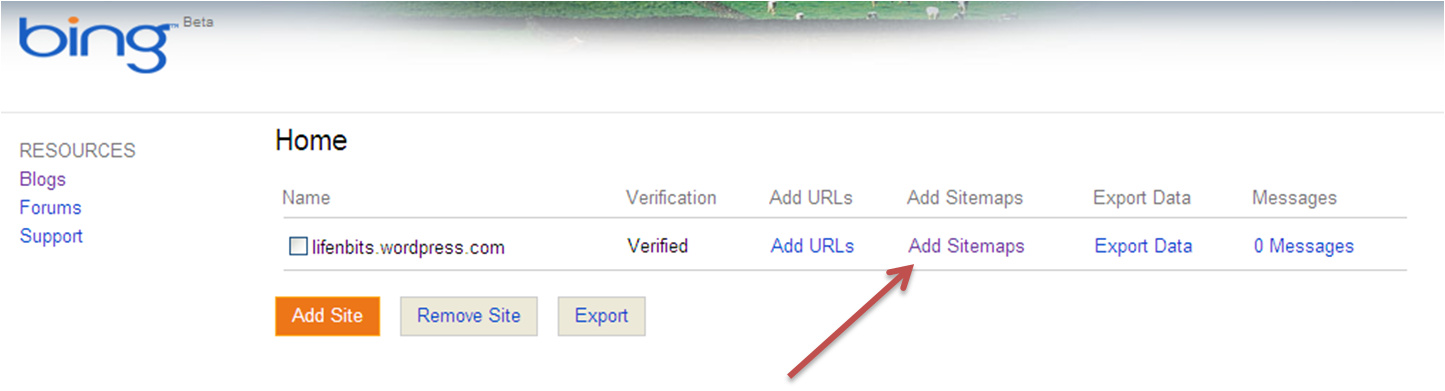
Bing.  To the right of your website, press Add Sitemaps.  Enter the sitemap address.
Yahoo.  On the left-hand side, press Feeds.  Complete the address of the sitemap in the text box provided.  For example, type sitemap.xml.  Press Add Feed.
You have now completed all the steps needed to bring your site up to speed with the major search engines.  You will be able not only to search for your website but also for content within your site.  Please type your comments, questions and suggestions.